
You tap a TikTok link and the video keeps loading. You refresh the page, try another video, or switch to the app, but you still can’t watch. Sometimes there’s an error message. Other times, all you see is a blank screen.
Before you try to get TikTok unblocked, check what’s stopping it from loading. This guide walks you through how to tell whether you’re dealing with a network block, a regional restriction, or an app issue, and what to try in each case.
Why Is TikTok Blocked?
If you’re trying to get TikTok unblocked, where and how you’re accessing it matters. Three common restrictions can affect whether you can open TikTok or install the app.
- School or workplace restrictions: Schools and employers may block TikTok on their Wi-Fi or restrict access on managed devices, such as school Chromebooks.
- Regional restrictions: TikTok may be unavailable in some countries or regions. In others, the service may be available while certain features or videos are restricted.
- App store availability: TikTok may be missing from your local App Store or Google Play. That can prevent you from downloading or updating the app, even if you can still open TikTok in a browser.
How to Tell If TikTok Is Blocked or Just Not Working
A blank screen or a video that keeps buffering doesn’t tell you why TikTok won’t load. Before you try to get TikTok unblocked, compare the same video in the app and in a browser, then check whether the result changes on a different network.
Compare TikTok Web and the App
Pick a public TikTok video and open the same link in the app and on tiktok.com. Use the same device and internet connection for both tests. Check whether the video plays as well as whether the page opens.
If the video plays in your browser but fails in the TikTok app, start by looking at the app. If it fails in both, try the same link on another network.
Compare Two Networks on the Same Device
On a personal phone, open the video on Wi-Fi, then try again on mobile data where you’re allowed to use it. Keep the device and video link the same so you can see whether changing the connection makes a difference.
If TikTok plays on mobile data but fails on one Wi-Fi network, the issue may be with that network. A message saying the site is blocked supports that conclusion. A timeout could also be a connection problem. If TikTok fails only on a school Chromebook or work laptop, look for a message about browser or device policies. If it fails on both networks, check the exact error before assuming it’s a regional block.
Read the Error Message and Check Availability
The wording can help you tell a network block from a regional restriction, an account issue, or an app that’s unavailable to download.
| What you see | What it suggests | Where to go next |
| A block page appears on one Wi-Fi network | That network may filter TikTok traffic | If TikTok Is Blocked on a Specific Network |
| TikTok says a service or feature is unavailable in your region | Access may vary by location | If TikTok Is Unavailable in Your Region |
| TikTok is missing from your app store, but the website works | The app’s listing may be unavailable for your store region or device | If TikTok Is Missing From Your App Store |
| The website works, but the app crashes or shows an account restriction | A crash points to an app issue. A restriction notice points to your account. | TikTok Help Center |
| TikTok times out across multiple devices and networks | A service outage is possible | Check whether TikTok is experiencing a wider outage |
How to Get TikTok Unblocked Based on the Cause
If TikTok works on another connection, switch networks. If you see a regional restriction, check whether TikTok is available from another location you’re permitted to connect through. If you can’t download the app, try the official web version.
If TikTok Is Blocked on a Specific Network
Switch to mobile data or another Wi-Fi network you’re allowed to use. On your phone, turn off Wi-Fi and reopen the same TikTok link using mobile data. If you’re on a personal laptop, you can connect it to your phone’s hotspot and open the video at the official TikTok website.
If you need TikTok for work, ask IT whether they can allow access on the company network. If the problem happens on your own Wi-Fi and the browser says it can’t find tiktok.com, try restoring your device’s DNS settings to Automatic if you previously changed them, then reload the page.
For TikTok Web, try a VPN or residential proxy with an exit location where TikTok is available and you’re permitted to access it. Connect the VPN or configure the proxy in your browser, then reopen the same video link. Check that the video plays. The homepage can load even when a specific video is still unavailable.
Choose between a VPN and a proxy based on how you use TikTok. A VPN can route traffic from multiple apps, depending on its settings. A residential proxy configured in your browser applies to that browser’s traffic.
If TikTok Is Missing From Your App Store
Open the original video link in your browser. If the link keeps trying to launch the app, copy it and paste it directly into your browser’s address bar. You can also go to the official TikTok website and search for the creator by username.
If you need the app itself, check TikTok’s official download channels for your device and store region. For watching a public video or signing in, start with the official site. Third-party “TikTok unblocked” sites may offer limited playback.
TikTok Unblocked at School: Wi-Fi and Chromebook
If you’re trying to unblock TikTok at school, check whether the restriction comes from the school Wi-Fi or the device you’re using. A Wi-Fi filter applies to that connection, while a school-managed Chromebook can enforce its browsing rules on other networks too.
Power scalable growth for every cross-border business scenario with IPFLY’s reliable global proxy network
When TikTok Is Blocked on School Wi-Fi
If TikTok works on your personal device elsewhere but shows a block page on campus Wi-Fi, the school network is likely filtering it. If you need a TikTok video for class, send your teacher or school IT team the exact video link and explain what it’s for. They may be able to approve access to that page or share the video through a platform your school already allows.
When TikTok Is Blocked on a School Chromebook
If TikTok still shows a block message after you connect your school Chromebook to another approved network, the restriction may be part of the device’s browsing policy. Share the video link and the exact error message with school IT. They can confirm whether the Chromebook is blocking the site and tell you how to access the material for class.
How to Unblock TikTok with an IPFLY Residential Proxy
If you only need to test TikTok Web, a browser proxy lets you change the IP address for that browser without routing your other apps through a device-wide VPN. IPFLY residential proxies let you choose a target country or region. You can also use a sticky session to keep the same IP while you check whether the page loads and the video plays.
Step 1: Choose a Proxy Location in IPFLY
Choose a country or region where TikTok is available and you’re authorized to test access. Use a residential proxy with a sticky session to keep the same IP during a short test. If you’ll be testing the same video over several days, choose an ISP proxy in your target region so you can reuse the same IP. Then copy the proxy host, port, username, and password from your IPFLY dashboard.
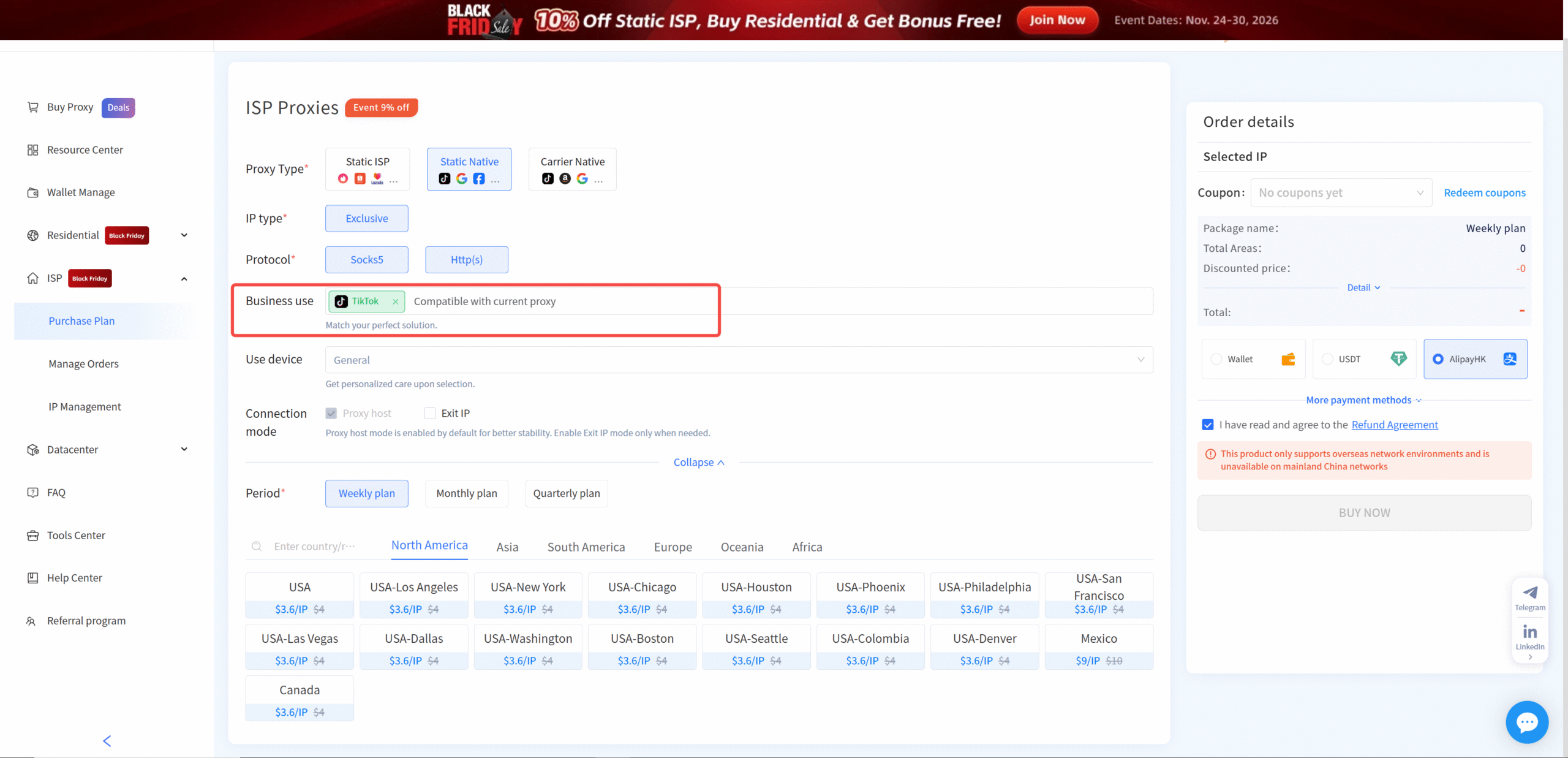
Step 2: Configure the Proxy in Your Desktop Browser
Use a browser or proxy extension that supports your chosen protocol and authentication method. Enter the host, port, username, and password from the IPFLY dashboard, then enable the proxy. The settings and field names depend on the browser or extension you use.
Step 3: Verify Your IP Before Opening TikTok
Open an IP checker in the same browser profile you just configured. Confirm that it shows the proxy’s public IP and that the reported country or region matches your selection. If it still shows your usual IP, check that the proxy is enabled for that profile before moving on.
Step 4: Retest the Same TikTok Video
Paste the original public TikTok video link you used earlier into the same browser. Record two results separately: did the page load, and did the video play? If the page opens but playback still fails, note the exact error message. This test shows what works in the browser using the proxy. The TikTok mobile app uses its own connection settings.
Why TikTok Still Won’t Load After You Change Your IP
If TikTok still won’t load after you change your IP, check two things separately: whether the proxy changed your browser’s public IP and whether the same TikTok video actually plays.
- Your public IP hasn’t changed. Open an IP checker in the same browser profile you use for TikTok. If it still shows your usual IP, make sure the proxy is enabled and check the protocol, host, port, and login credentials.
- TikTok works in the browser, but the app still fails. A proxy configured in your browser only covers that browser’s traffic. Check which connection the TikTok app is using, then try updating the app or clearing its cache.
- Your IP changed, but TikTok still won’t load. Check whether the whole site fails to open or just one video won’t play. If other public videos work, check the original video for a playback or regional availability message. If TikTok shows an account restriction, follow the instructions in the notice or use the TikTok Help Center.
FAQs About TikTok Unblocked
Can I watch TikTok without downloading the app?
Yes. Open a public video link on TikTok’s official website. Some videos or features may still require you to sign in.
How can I get TikTok unblocked at school?
If you need a video for class, send the exact link to your teacher or school IT team. They may be able to approve access or share the video through a platform your school allows.
Can a proxy unblock TikTok?
A proxy can help when access depends on your IP location. If you set up the proxy in your browser, test TikTok Web in that same browser. Account restrictions need to be resolved through TikTok.
Do I need a static IP to watch TikTok through a proxy?
For a quick playback test, a sticky session can keep the same IP while you check the video. A static IP is useful if you want to repeat the test over several days from the same address.
Why does TikTok load but a specific video won’t play?
If other public videos play, the issue may be specific to that video. It could have been removed, made private, or restricted in your region. Check the message on the original video page.
Conclusion
The best way to unblock TikTok depends on what’s stopping you from accessing it. Try the official web version if the app is unavailable, or use an approved connection if the issue is limited to one network. For authorized regional testing with an IPFLY proxy, confirm your browser’s public IP first, then open the original TikTok link and check whether the video plays.