

Tracking breaking stories across dozens of news sites by copying and pasting text into a spreadsheet takes hours and leaves room for human error. Web scraping news replaces that repetitive work with automated tools that open public news pages, pull out key details like headlines and dates, and save them into an organized file.
In this beginner-friendly guide, you will learn what news scraping is, how the extraction process works behind the scenes, and why businesses and researchers rely on it. We will also walk through two practical ways to collect articles—using no-code AI prompts or simple Python scripts—and show how to fix common real-world issues like duplicate stories, messy timezones, and regional headline differences.
What Is Web Scraping News?
Web scraping news is the automated process of collecting public text and details from online news articles and organizing them into a clean format, such as a spreadsheet or database. Instead of reading a web page with human eyes and highlighting text with a mouse, an automated program opens the page behind the scenes and pulls out only the useful parts.
To keep collection fair and legal, scrapers focus on publicly available web pages rather than private accounts or paid subscriptions. Responsible users also check a website’s public rules—often listed in a simple text file called robots.txt—and avoid sending too many rapid requests that could slow down a publisher’s server.
Turning News Web Pages into Clean Spreadsheets
Imagine hiring a fast digital assistant whose only job is to read online newspapers. When a link is handed to that assistant, it ignores flashing banner ads, navigation menus, and comment sections. It copies only the headline, the reporter’s name, the date, and the story text, then places each item into its own neat column.
When this happens across dozens or hundreds of articles, scattered web pages turn into a single searchable table. A team can then sort stories by date, filter by topic, or compare how different outlets cover the same event.
What Information Can You Collect from a News Page?
Almost every online news article follows a predictable visual layout. Even without looking at website code, a reader can spot the exact pieces of information that automated tools extract:
| News Field | What It Looks Like on the Page | Why It Matters in a Dataset |
| Headline | The large bold title at the top of the story | Helps identify the main topic and group related articles quickly |
| Article Body | The main paragraphs of the news report | Provides the full text needed for reading, summaries, or text analysis |
| Author / Byline | The journalist or news agency name under the title | Shows who wrote the piece and helps distinguish original reporting from wire reposts |
| Publish Date | The timestamp showing when the story went live or updated | Keeps timelines accurate when tracking breaking events |
| Category / Tags | Labels such as “Business,” “Tech,” or “World” | Makes it easy to filter stories by industry or beat |
| Source URL | The web address in the browser bar | Serves as a permanent reference link back to the original article |
How Does Web Scraping News Work?
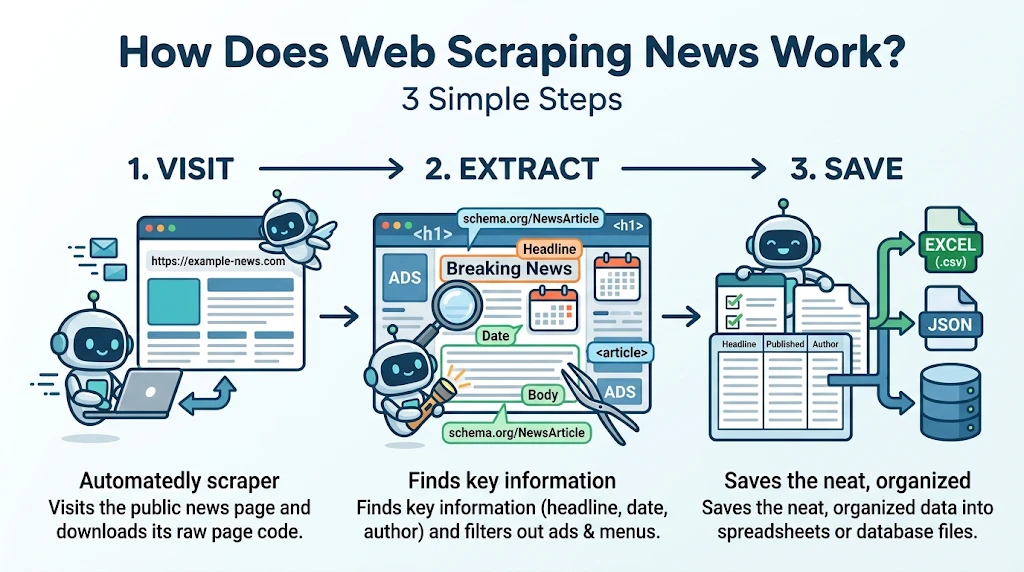
Even if you have never written a line of code, the process behind web scraping news is easy to picture. Every web page you read in a browser is built from underlying text instructions—mostly HTML—that tell your screen where to place the headline, where the story paragraphs begin, and which boxes hold advertisements. A news scraper reads those same instructions automatically and follows three simple steps.
Step 1: Visiting the News Page Automatically
First, the scraping tool acts much like a regular web browser. When you give it a list of news URLs, it sends an automated request over the internet to open each public page and download its underlying page code. Instead of displaying colorful graphics on a screen, the tool keeps the raw text in memory so it can inspect the content quickly.
Step 2: Finding the Right Text Amid Ads and Menus
A typical news page is crowded with navigation bars, related-article widgets, newsletter pop-ups, and ads. To avoid copying that clutter, the scraper looks for specific markers in the page structure. Many publishers organize their articles using clear HTML containers or standardized metadata tags—such as the Schema.org NewsArticle vocabulary—that label which line is the headline, who wrote the piece, and when it was published. By matching those markers, the tool lifts out only the core story and leaves the surrounding noise behind.
Step 3: Saving Everything into a Structured File
Once the key fields are separated from the page layout, the scraper arranges them into neat rows and columns. Depending on your goal, the tool can export the finished batch into a CSV spreadsheet you can open in Excel, a lightweight JSON file for software applications, or a searchable database. News extraction follows the same core principles as general automated data scraping, where software collects public information from web pages and turns unstructured layouts into consistent records ready for analysis.
Why Do People and Businesses Scrape News Articles?
Understanding how news scraping works is only half the picture—the real value comes from what teams do with those organized articles once they are collected. When hundreds of daily reports sit inside a single searchable table instead of scattered browser tabs, patterns that would take days to spot manually show up in minutes.
Tracking Brand Mentions and Public Opinion
Communications and marketing teams use news scrapers to monitor how the press talks about their company, executives, or competitors. By gathering articles that mention specific brand names or product launches, teams can measure whether coverage is positive or negative, spot emerging customer concerns early, and respond to inaccurate claims before a story spreads widely.
Following Financial News and Market Shifts
In finance and business intelligence, timing matters. Analysts and research teams collect real-time headlines and earnings reports from financial outlets to track mergers, regulatory changes, supply chain disruptions, and industry trends. Feeding structured news feeds into internal dashboards helps decision-makers react to market-moving events without refreshing dozens of websites by hand.
Gathering Real-World Text for AI and Research
Academic researchers, journalists, and artificial intelligence teams rely on large archives of historical and current news to study language, track public policy debates, or evaluate how AI models summarize factual events. Because news articles typically follow clear editorial standards and carry accurate publication dates, properly attributed public news datasets provide a reliable foundation for text analysis and model benchmarking.
Should You Use AI Tools or Python to Scrape News?

Before setting up your first workflow, it helps to pick the approach that matches your technical comfort level and the number of articles you plan to collect. Today, most news extraction projects fall into two practical paths: letting an AI model interpret the page like a human reader, or writing a lightweight Python script that follows fixed layout rules.
| Factor | No-Code / Low-Code AI Extraction | Custom Python Scripts |
| Coding Required | None to minimal (plain-language prompts) | Basic Python knowledge |
| Setup Speed | Minutes—works right away on unfamiliar sites | Takes longer to inspect page layout and write rules |
| Cost at High Volume | Higher, since each page uses AI processing credits | Very low once the script is written |
| Handling Layout Redesigns | Adapts easily when a website changes its design | Needs rule updates if page tags change |
Using AI When You Want a Simple, No-Code Start
Large language models (LLMs) can read messy article text and pull out headlines, summaries, and key names without needing exact HTML tag instructions. For beginners or small teams collecting a few dozen articles across many different local blogs, AI tools remove the need to build custom rules for every single domain. The main trade-off is running cost: sending thousands of full news pages through an AI model every day adds up quickly compared to traditional code.
Using Python When You Need Speed and Daily Automation
When a project requires collecting hundreds or thousands of articles on a daily schedule, writing a dedicated script is usually much faster and more economical. Many data teams choose Python for web scraping because its readable syntax and mature ecosystem of HTML parsing and browser automation libraries make it straightforward to turn raw news pages into clean spreadsheets. Once a Python script is configured for a major news outlet, it can run automatically around the clock with minimal ongoing expense.
How Do You Scrape News Articles Step by Step?
Once you know whether you want a quick AI workflow or an automated Python script, setting up your first news scraper takes only a few building blocks. Below is a practical look at how both methods work in practice, starting with the simplest prompt-based approach and moving into lightweight code.
How to Extract News Data with an AI Prompt
If you prefer not to write HTML parsing rules, you can paste the readable text of an article into an AI assistant or pass it through an AI API. Before sending the text, remove clutter like top navigation menus, sidebar links, and footer notices so the model focuses purely on the story and uses fewer processing tokens.
Next, give the AI clear instructions on the exact structure you want back:
Read the news article text below and return a valid JSON object with these fields:
- "headline": The main title of the article
- "author": The reporter or news agency name (use "Unknown" if missing)
- "published_date": The publication date shown in the text
- "summary": A two-sentence summary of the main event

Article text:
[Paste cleaned article text here]
Because the instructions define exact field names, the model turns an unstructured block of text into consistent records that can be exported straight into a table.
Master proxy setup, integration and performance optimization quickly with IPFLY guides
How to Scrape Standard News Pages with Python
Many traditional news sites place their headlines and paragraphs directly inside the initial HTML file that loads when you visit a link. For these standard pages, developers commonly automate HTTP requests in Python using the requests library to fetch the page, then pass the HTML to a parser described in the Beautiful Soup documentation to locate specific title and paragraph tags:
import requests
from bs4 import BeautifulSoup

url = "https://example-news-site.com/world/sample-story"
headers = {"User-Agent": "Mozilla/5.0 (compatible; NewsResearchBot/1.0)"}

# 1. Download the public web page
response = requests.get(url, headers=headers, timeout=10)
soup = BeautifulSoup(response.text, "html.parser")

# 2. Pick out the main headline and story paragraphs
headline = soup.find("h1").get_text(strip=True)
paragraphs = [p.get_text(strip=True) for p in soup.select("article p")]
article_body = "\n".join(paragraphs)

print("Headline:", headline)
print("Preview:", article_body[:200])
In just a few lines, the script requests the public page with a clear User-Agent header, locates the main <h1> heading, and joins all paragraphs inside the <article> container while ignoring unrelated page widgets.
How to Handle Dynamic News Pages That Load Slowly (Playwright)
Some modern news portals build their pages using JavaScript, meaning the headline and story text do not appear until a real browser runs page scripts after the initial load. If a standard requests call returns an empty article body, teams turn to headless browsers for web scraping—such as the browser automation framework outlined in the Playwright Python documentation—to wait until the story renders on screen before extracting it:
from playwright.sync_api import sync_playwright

with sync_playwright() as p:
    browser = p.chromium.launch(headless=True)
    page = browser.new_page()
    page.goto("https://example-dynamic-news.com/tech/latest-update", wait_until="domcontentloaded")

    # Wait until the headline element appears on the page
    page.wait_for_selector("h1")
    headline = page.locator("h1").inner_text()
    print("Loaded Headline:", headline)

    browser.close()
Running a headless browser takes slightly more memory than a plain HTTP request, so it works best when reserved for JavaScript-heavy news portals rather than simple static pages.
What Happens After You Start Scraping?
Pulling a single article onto your screen is a great milestone, but scaling up to dozens of news outlets quickly reveals messy data problems that simple tutorials rarely mention. Without a cleanup step, your spreadsheet fills up with duplicate wire stories, scrambled timelines, and inconsistent regional versions. Fixing three common issues early keeps your dataset accurate and ready to use.
How to Filter Out Duplicate Stories Reprinted Across Sites
Major news agencies like the Associated Press or Reuters license the same breaking report to hundreds of local newspapers and online portals. If your scraper visits twenty outlets in one morning, you might end up saving the exact same story twelve times under slightly different web addresses.
Two lightweight checks prevent duplicates from cluttering your records:
- Clean the canonical URL: Strip tracking parameters (such as
?utm_source=...or?ref=...) and check the page’s<link rel="canonical">tag so minor link variations map back to one master address. - Compare text fingerprints: Before saving a new row, normalize the headline and first two paragraphs to lowercase, remove extra spaces, and generate a short hash fingerprint (such as SHA-256). If that fingerprint already exists in your table, skip the duplicate reprint.
How to Fix Confusing Dates and Timezones from Global Sites
When collecting stories across international outlets, publication timestamps rarely arrive in a matching format. One site prints "2 hours ago", another displays "Nov 22, 2026, 4:30 PM EST", and a European portal uses "22/11/2026 21:30 GMT". Sorting those mixed strings alphabetically will put events in the wrong order.
To keep timelines reliable, convert every timestamp into Coordinated Universal Time (UTC) using the standardized W3C Date and Time Formats profile of ISO 8601 (for example, 2026-11-22T21:30:00Z) before writing it to your database. Storing both published_at and updated_at in UTC ensures breaking news feeds line up accurately regardless of where each publisher is headquartered.
Why Does the Same News Website Show Different Headlines by Country?
Many global news portals customize their front pages and regional sections based on the visitor’s geographic location. A reader opening a major outlet from New York sees U.S. domestic headlines, local market tickers, and North American edition links, while someone visiting the same domain from London or Singapore sees a completely different top-story lineup or currency format.
If your goal is to verify local coverage in a specific country or city, running every request from a single server location can quietly skew your results—or trigger rate limits when one IP address sends too many rapid requests to the same domain.
How to Keep Your Scraper Running with IPFLY?

When you move from testing a single article to polling dozens of news sites every hour—or checking how headlines appear across different countries—your network connection becomes just as important as your parsing code. If every request leaves from one static data-center address, news servers may return 429 Too Many Requests errors or serve a generic international homepage instead of the local edition you need to verify.
Two Core IPFLY Proxy Options for News Collection
To keep automated requests stable and location-accurate, IPFLY offers two main residential-grade proxy types designed for different network behaviors:
- IPFLY Rotating Residential Proxies: These route your scraper’s requests through a global pool of real residential IP addresses with country- and city-level targeting. You can automatically switch to a fresh IP on every request or hold the same IP for a short sticky-session window, and usage is billed strictly by traffic volume.
- IPFLY Static ISP Proxies: These provide dedicated, non-rotating IP addresses hosted on real Internet Service Provider (ISP) infrastructure. Rather than changing on each request, the IP stays fixed over your chosen billing duration (priced per IP and time period), offering consistent session continuity.
How to Choose Between Them for Your Workflow
Understanding the difference comes down to choosing the right proxies for web scraping based on how often your script switches sites and whether it needs a persistent identity:
- Pick Rotating Residential Proxies when you are scanning many different news outlets at once, checking localized front pages across multiple countries or cities, or starting out with small test batches where pay-per-traffic pricing keeps costs predictable.
- Pick Static ISP Proxies when your workflow monitors a fixed group of regional portals over long periods or needs a steady, unchanging IP address to maintain an authorized session without frequent re-verification.
Integrating Proxies Responsibly into Your Scraper
Both HTTP(S) and SOCKS5 endpoints can be added directly to Python’s requests session or a Playwright browser context in a few lines of configuration. Keep in mind that proxies improve regional accuracy and connection stability, not unrestricted access: sticky sessions remain active for a set window rather than permanently, and healthy scrapers still pair proxy routing with polite request intervals, clear User-Agent headers, and respect for each publisher’s robots.txt guidelines.
Frequently Asked Questions About Web Scraping News
Is web scraping news legal?
Collecting publicly available headlines and facts is generally legal when you respect robots.txt rules, avoid bypassing paywalls, and do not republish copyrighted full articles commercially.
Can I scrape news articles without knowing how to code?
Yes—no-code browser extensions, visual scrapers, and AI prompts let you extract headlines and summaries without writing code.
What is the difference between RSS feeds and web scraping news?
RSS feeds only provide official headlines and short snippets, whereas web scraping pulls the complete article text, author, and metadata directly from the page.
Why do some news websites block automated requests or show a subscription box?
Sites block rapid requests from a single IP to prevent server overload, while subscription boxes hide full stories reserved for paying readers.
What is the easiest format for saving scraped news articles?
CSV is the easiest format for spreadsheets like Excel, while JSONL or a database works better for large, multi-paragraph archives.
Conclusion
Web scraping news does not require an engineering degree to understand or put into practice. By starting with clear article fields, choosing between a quick AI prompt or a repeatable Python script, and cleaning up duplicate wire stories and mixed timezones early, anyone can turn scattered daily headlines into reliable data. As your collection grows across more outlets and regions, pairing polite scraping habits with IPFLY’s residential proxy network helps keep requests steady and geographically accurate.